> ## Documentation Index
> Fetch the complete documentation index at: https://docs.flatpeak.com/llms.txt
> Use this file to discover all available pages before exploring further.
# Nomos Energy integration guide
This guide explains how to enable your customers to connect their [Nomos-powered](https://nomos.energy) energy plan through your integration with Flatpeak.
## Overview
Flatpeak enables you to offer your own branded energy plans by partnering with a supported white-label energy provider.
Currently, only Nomos — available in Germany and Austria — is supported. Additional providers will be added from Q1 2026 onwards.
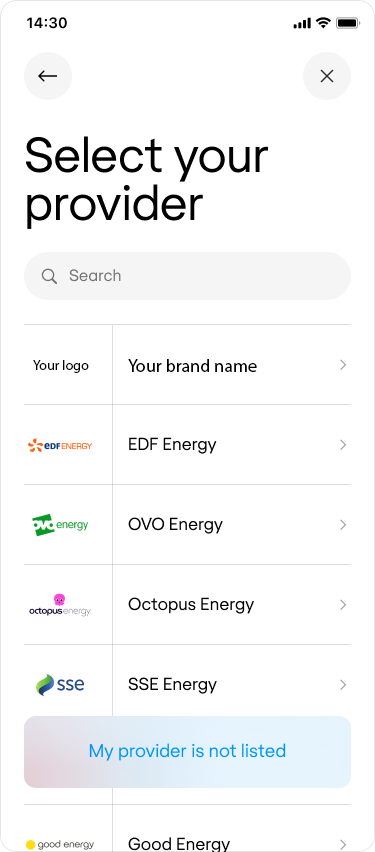
Once configured, your brand appears on the **Provider Selection page** in Connect, allowing customers to choose it during onboarding.
After they sign in, their tariff details become available through the Flatpeak APIs, just like with any other provider.
## Implementation
Before you begin, complete the following steps:
* [Contact Nomos](https://www.nomos.energy/en/demo) to create an account.
* Once you receive your `client_id` and `client_secret`, request that **[https://nomos.connect.flatpeak.energy](https://nomos.connect.flatpeak.energy)** be added to your authorised redirect URIs.
* Follow the [Authorisation Code Grant](https://docs.nomos.energy/authentication/authorization-code) flow to confirm your account is configured correctly.
1. Go to the [Flatpeak Dashboard](https://dashboard.flatpeak.com)
2. Navigate to **Integrations → Branded Plans → Nomos**.
3. Complete the configuration fields:
* Enter your Nomos `client_id` and `client_secret`
* Add your brand name
* Upload your logo
* Enable the integration by ticking the checkbox
* Click **Save**
Once configured, run Connect.
When entering an address in Germany or Austria, your logo will appear on the **Provider Selection** page.
 Get in touch with [support](https://dashboard.flatpeak.com/#support) shall you require further help setting up.