> ## Documentation Index
> Fetch the complete documentation index at: https://docs.flatpeak.com/llms.txt
> Use this file to discover all available pages before exploring further.
# How Flatpeak Connect works
Flatpeak Connect enables your customer-facing app to link their energy account with energy provider — securely and consistently across markets.
This guide explains how the Connect process works, the role of your app and backend, and how data flows through the system.
When a customer uses Connect, Flatpeak automatically selects the fastest and most accurate method available. If one method fails — for example, if the user skips login — the system instantly falls back to the next best option. No dead ends. No manual steps unless absolutely necessary.
**Connect prioritises tariff connection methods in this order:**
1. `DIRECT` – Instant, authenticated connection
2. `LIBRARY` – Selection from Flatpeak-maintained library
3. `MARKET` – Automatically links market-based tariff by geo-location
4. `MANUAL` – Customer input as a last resort
Explore [DIRECT provider integrations coverage](/guides/sources/providers) and [MARKET coverage](/guides/sources/market-rates)
The diagram below illustrates how sessions progress across these connection types:
```mermaid theme={"system"}
flowchart LR
A(["Start"]) -- Only if address
incomplete --> B["Postal
Address
"]
B --> S("Provider
Selection")
A --> S
S --> D("Direct
Login
(Auth)")
D -- "Yes" --> TSUM(["Tariff
Connected"])
D -- No --> L("Tariff
Library")
L -- "Yes" --> TSUM
L -- No --> MK["Market
mapping"]
MK -- "Yes" --> TSUM
MK -- No --> MU["Manual
input"]
MU -- "Yes" --> TSUM
B@{ shape: manual-input}
MK@{ shape: subproc}
MU@{ shape: manual-input}
B:::userAction
S:::userAction
D:::userAction
L:::userAction
MK:::userAction
MU:::userAction
classDef userAction fill:#cce5ff,stroke:#004085,color:#004085
style B stroke-dasharray: 5 5,stroke:#555,color:#333
style D fill:#00C853,color:#FFFFFF
```
```mermaid theme={"system"}
---
config:
layout: auto
---
flowchart LR
n1{"Address OK?"}
n1 -- Yes --> S@{ shape: manual-input, label: "Select provider" }
n1 -- No --> B@{ shape: doc, label: "Input address" } --> S
S --> D1{"Direct?"}
D1 -- Yes --> DF@{ shape: event, label: "Direct Auth \n (redirect, auth, return)" } --> n4@{ shape: diam, label: "Direct OK?" }
n4 -- Yes --> TSUM@{ shape: cross-circ, label: "Tariff Summary" }
n4 -- No --> D2
D1 -- No --> D2{"Library?"}
D2 -- Yes --> L@{ shape: manual-input, label: "Select tariff" }
L -- Success --> TSUM
L -- Not found --> D3
D2 -- No --> D3{"Market?"}
D3 -- Yes --> MK@{ shape: doc, label: "Surcharge" } --> TSUM
D3 -- No --> MU@{ shape: doc, label: "Manual input" } --> TSUM
%% Node styles
style DF fill:#00C853,color:#fff
style S fill:#cce5ff,stroke:#004085
style B fill:#cce5ff,stroke:#004085
style L fill:#cce5ff,stroke:#004085
style MK fill:#cce5ff,stroke:#004085
style MU fill:#cce5ff,stroke:#004085
style TSUM fill:#e2e3e5,stroke:#343a40,stroke-width:2px
```
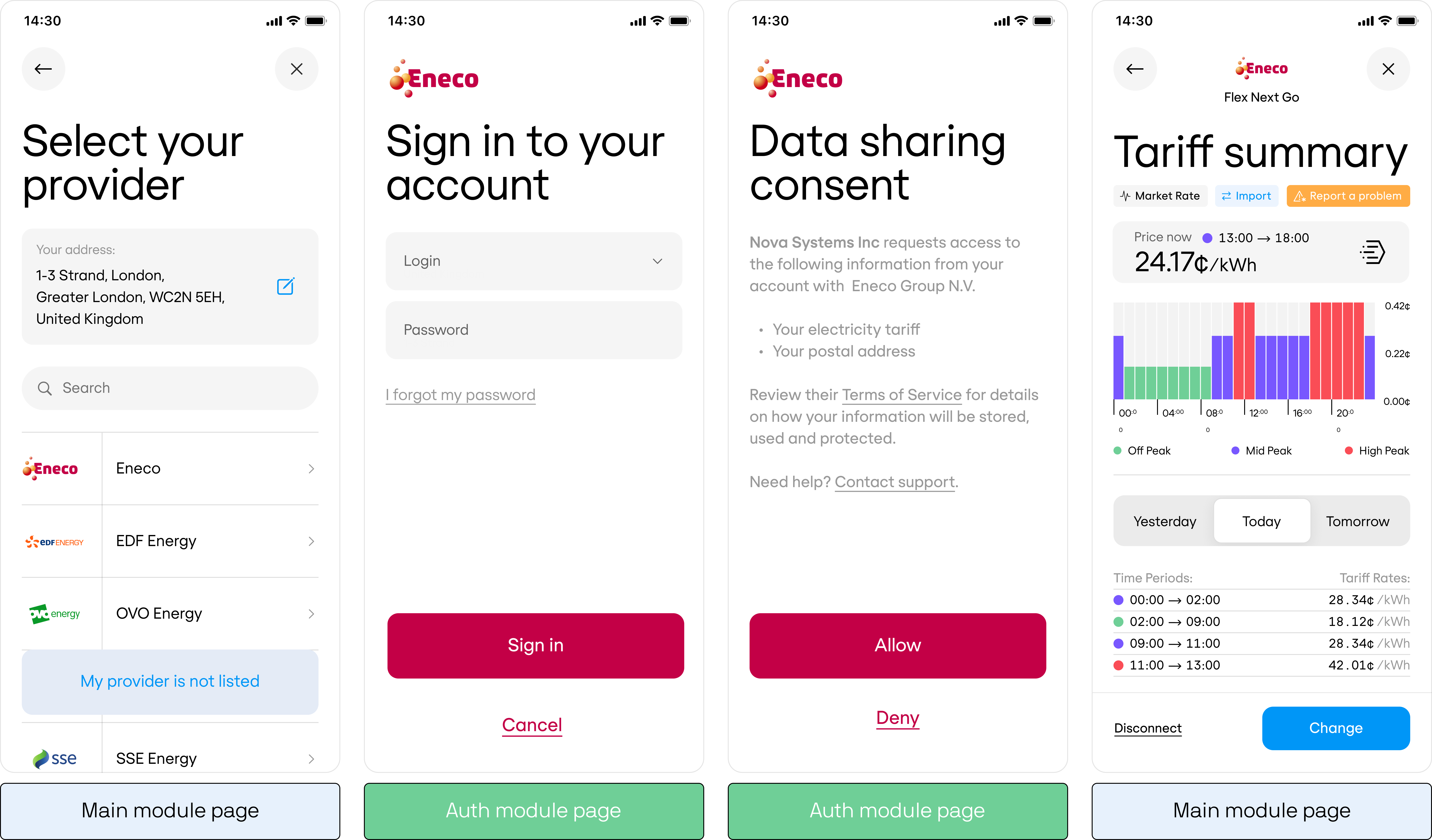
## Connect modules
The Flatpeak Connect is composed of two modules:
### 1. Main module
This module manages the core user interaction flow, including:
* [Postal address input](/api-reference/anode/connect/postal-address)
* [Provider selection](/api-reference/anode/connect/provider-selection)
* **Market tariff connection** (headless & automatic)
* [Library tariffs](/api-reference/anode/connect/library-selection)
* [Surcharges](/api-reference/anode/connect/surcharge-capture)
* [Manual tariff input](/api-reference/anode/connect/manual-tariff-capture)
* [Tariff summary display (and edit)](/api-reference/anode/connect/tariff-summary)
The UI of this module **is customisable**. You can either:
* Forking Flatpeak’s [reference implementation](/guides/connect#webview-integration) and customise it and integrate via WebView, or
* Implement in your your apps’ native framework by [integrating Connect API](/guides/connect#native-api-integration) (recommended).
### 2. Auth module
When a customer selects a provider with a **direct integration** to Flatpeak, they are redirected to the Auth module (shown in green in the diagram above).
This module handles:
* **Redirecting to the energy provider’s authentication page**
* **Secure login at the provider’s page**
* **Return to the Main module**
This module is **not customisable**, as it is usually hosted by the energy provider. It must be displayed in a **WebView**.
 ## URL parameters when creating Connect tokens
When calling the [create-connect-token](/api-reference/anode/connect/create-a-connect-token) endpoint , you must specify the environment URLs used during the Connect flow.
| Parameter | Description |
| :------------- | :------------------------------------------------------------------------------------------------------------------------------------------------------------------------------------------------------------------------------------------------------ |
| `connect_url` | URL the customer is redirected to during the **Handling Callback** step of the [Provider Login Redirect](/api-reference/anode/connect/provider-login). Specify either the URL where your Connect web app is hosted or a deep link into your native app. |
| `callback_url` | URL where the customer is redirected after they complete or exit their Connect session. |
Example configurations:
**Option 1. Using Connect web app hosted by Flatpeak**
```json theme={"system"}
"connect_url": "https://anode.connect-web.flatpeak.com"
```
**Option 2. Hosting the Connect web app yourself**
```json theme={"system"}
"connect_url": "https://flatpeak-connect-web.yourapp.com",
"callback_url": "yourapp://flatpeak/callback"
```
**Option 3. Implementing Connect natively via the API**
```json theme={"system"}
"connect_url": "yourapp://flatpeak/connect",
"callback_url": "yourapp://flatpeak/callback"
```
## URL parameters when creating Connect tokens
When calling the [create-connect-token](/api-reference/anode/connect/create-a-connect-token) endpoint , you must specify the environment URLs used during the Connect flow.
| Parameter | Description |
| :------------- | :------------------------------------------------------------------------------------------------------------------------------------------------------------------------------------------------------------------------------------------------------ |
| `connect_url` | URL the customer is redirected to during the **Handling Callback** step of the [Provider Login Redirect](/api-reference/anode/connect/provider-login). Specify either the URL where your Connect web app is hosted or a deep link into your native app. |
| `callback_url` | URL where the customer is redirected after they complete or exit their Connect session. |
Example configurations:
**Option 1. Using Connect web app hosted by Flatpeak**
```json theme={"system"}
"connect_url": "https://anode.connect-web.flatpeak.com"
```
**Option 2. Hosting the Connect web app yourself**
```json theme={"system"}
"connect_url": "https://flatpeak-connect-web.yourapp.com",
"callback_url": "yourapp://flatpeak/callback"
```
**Option 3. Implementing Connect natively via the API**
```json theme={"system"}
"connect_url": "yourapp://flatpeak/connect",
"callback_url": "yourapp://flatpeak/callback"
```