> ## Documentation Index
> Fetch the complete documentation index at: https://docs.flatpeak.com/llms.txt
> Use this file to discover all available pages before exploring further.
# Add tariff settings page to your app
When [integrating Flatpeak Connect into your app](/guides/connect), you should provide customers with a way not only to link their tariff, but also to view its status, make changes, and disconnect.
This guide explains how to build that page.
## How tariffs make up the energy price
Depending on their location, customers may have contracts with multiple energy providers simultaneously.
* For example, they may buy electricity from "Provider A" while selling surplus generation to "Provider B".
* They may also have a separate agreement with a grid operator for energy delivery.
* Additionally, customers may lease a PV system and pay per kWh of solar energy generated.
Flatpeak supports all of these scenarios by treating each tariff as a price component, storing them separately, and automatically combining them when calculating the total energy price.
## Tariff categories, contexts, and energy flow directions
1. Flatpeak distinguishes between two energy tariff types:
| Tariff Type | Description |
| :-------------- | :------------------------------------------------------------------------------------------------------------------------- |
| `COMMODITY` | The price of electricity itself.
*Think of it as “the price of electrons.”* |
| `NON_COMMODITY` | Grid operator charges for delivering electricity.
*Think of it as “the price of delivering and governing electrons.”* |
3. Flatpeak links and stores tariffs in the following three contexts:
| Tariff Context | Description |
| :------------- | :--------------------------------------------------------------- |
| `IMPORT` | Price of electricity sent from the energy grid into the property |
| `EXPORT` | Price of electricity sent from the property to the energy grid |
| `LOCAL` | Price of electricity generated locally (i.e. with a PV system) |
3. Finally, tariffs can be applied to two directions of energy flow:
| Energy Flow Direction | Description |
| :-------------------- | :-------------------------------------------------- |
| `INBOUND` | Electricity transmitted **to** property or device |
| `OUTBOUND` | Electricity transmitted **from** property or device |
## Implementation
### Before customer runs Connect for the first time
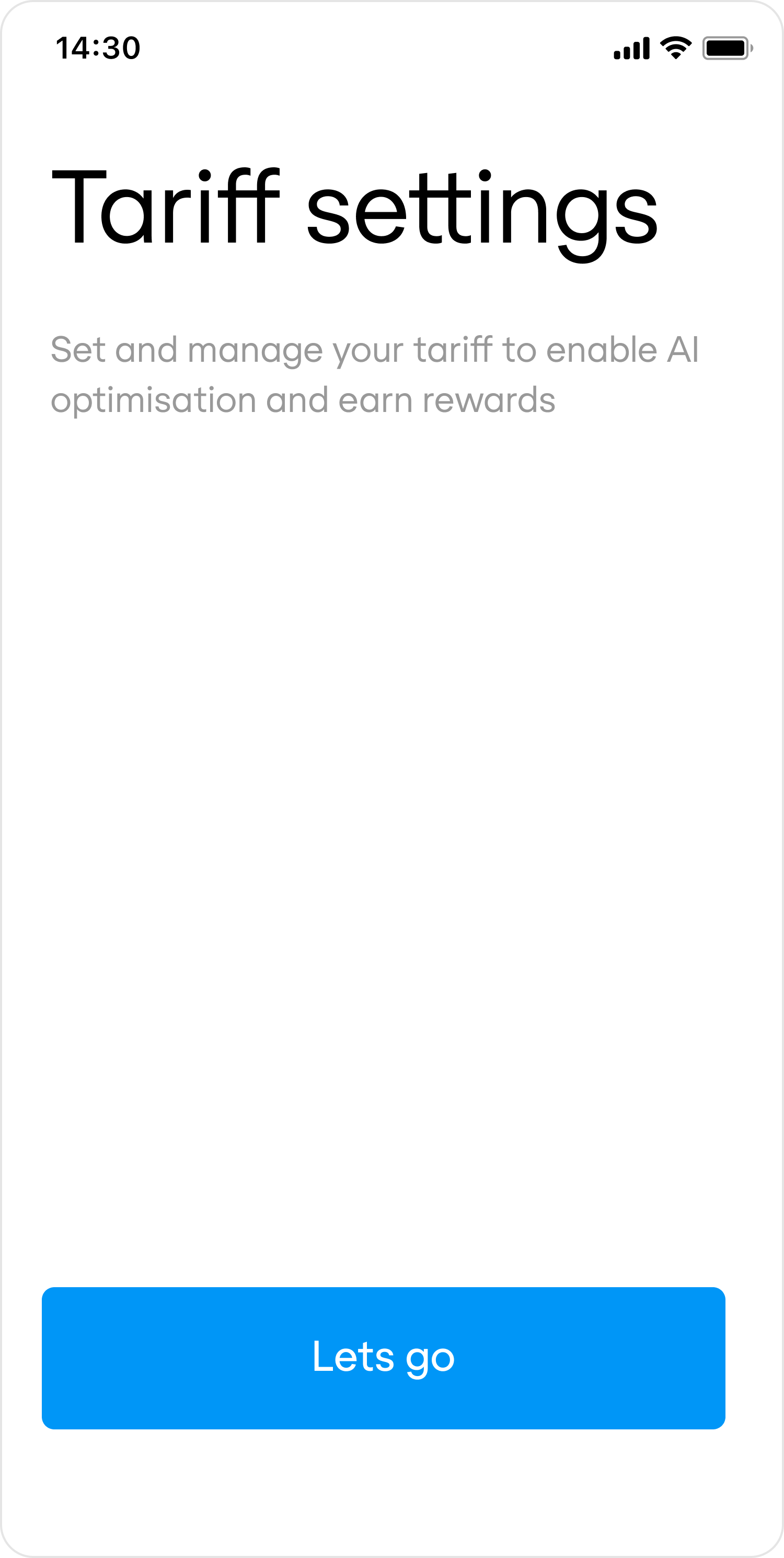
Show a default set of options covering possible tariff type and direction combinations.
Typical configurations by use case:
| | |
| :-------------------- | :-------------------------------------------------------- |
| EV charger or HVAC | `COMMODITY+IMPORT` |
| Energy storage system | `COMMODITY+IMPORT`, `COMMODITY+EXPORT` |
| Solar (PV) system | `COMMODITY+IMPORT`, `COMMODITY+EXPORT`, `COMMODITY+LOCAL` |
Once the customer connects a `COMMODITY+IMPORT` tariff, Flatpeak may also provide the option to connect a `NON_COMMODITY+IMPORT` tariff (explained later in this guide).
To launch Connect for a specific combination of tariff type and direction, specify it when calling the [create-connect-token](/api-reference/anode/connect/create-a-connect-token) endpoint.
 ```json Request example {16,17} theme={"system"}
curl --request POST \
--url https://api.flatpeak.com/connect/token \
--header 'Authorization: Bearer ' \
--header 'Content-Type: application/json' \
--data '{
"connect_url": "",
"callback_url": "",
"postal_address": {
"address_line1": "1-3",
"address_line2": "Strand",
"city": "London",
"state": "Greater London",
"post_code": "WC2N 5EH",
"country_code": "GB"
},
"tariff_direction": "IMPORT",
"tariff_type": "COMMODITY"
}'
```
```json Response example theme={"system"}
{
"connect_token": "cot_65df3e949a785c52283026ec",
"expires_in": 86400,
"live_mode": true
}
```
### After at least one tariff is connected
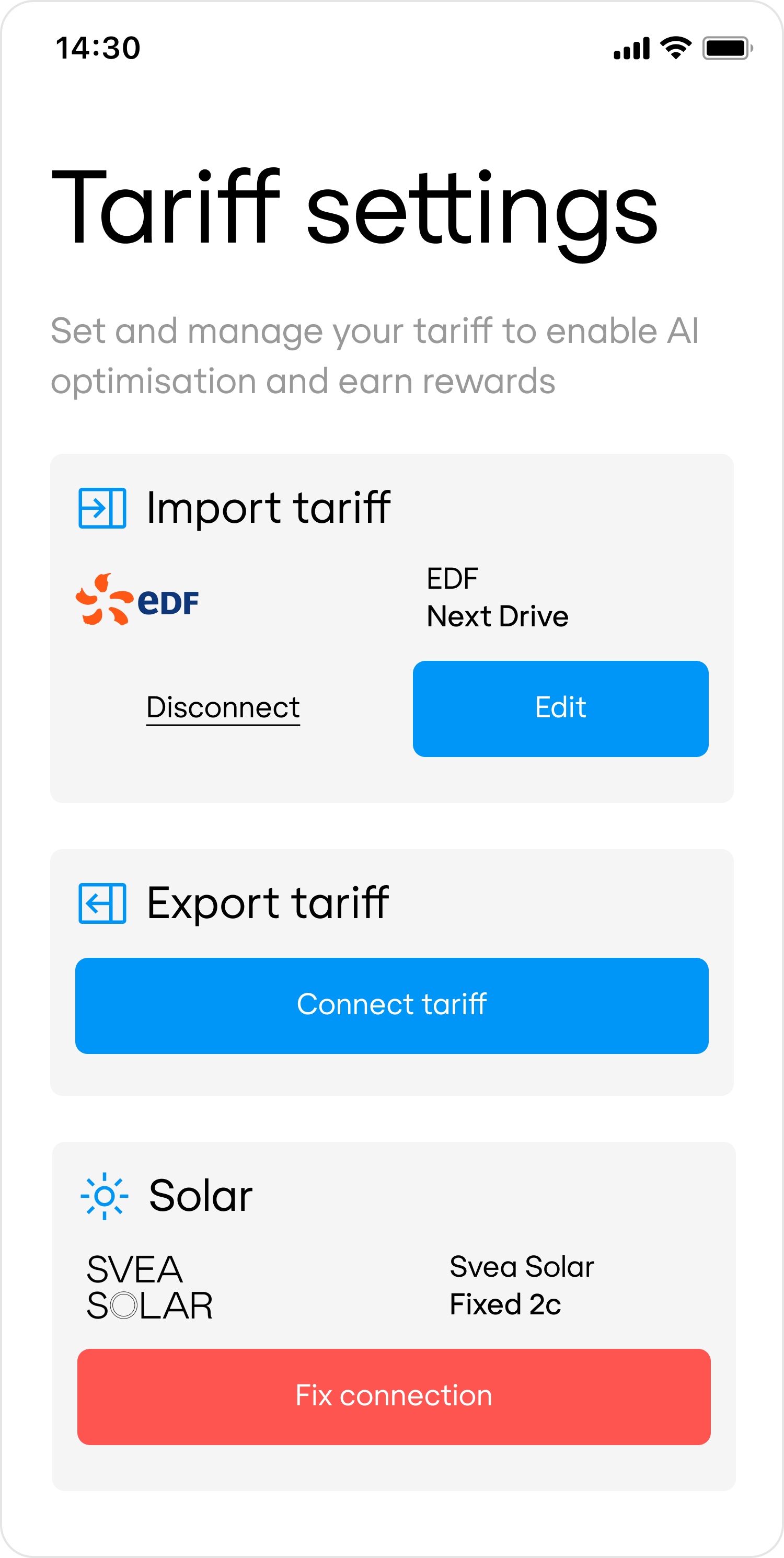
To allow customers to view, update, or disconnect their tariff, your app must first display their current tariff connections. To do this, call the [retrieve-location-status](/api-reference/anode/locations/retrieve-a-location-status) endpoint.
Use the response to populate the configuration of your Tariff Connection Page in your app:
```json Request example {16,17} theme={"system"}
curl --request POST \
--url https://api.flatpeak.com/connect/token \
--header 'Authorization: Bearer ' \
--header 'Content-Type: application/json' \
--data '{
"connect_url": "",
"callback_url": "",
"postal_address": {
"address_line1": "1-3",
"address_line2": "Strand",
"city": "London",
"state": "Greater London",
"post_code": "WC2N 5EH",
"country_code": "GB"
},
"tariff_direction": "IMPORT",
"tariff_type": "COMMODITY"
}'
```
```json Response example theme={"system"}
{
"connect_token": "cot_65df3e949a785c52283026ec",
"expires_in": 86400,
"live_mode": true
}
```
### After at least one tariff is connected
To allow customers to view, update, or disconnect their tariff, your app must first display their current tariff connections. To do this, call the [retrieve-location-status](/api-reference/anode/locations/retrieve-a-location-status) endpoint.
Use the response to populate the configuration of your Tariff Connection Page in your app:
 ```http Request example theme={"system"}
curl --request GET \
--url https://api.flatpeak.com/locations/loc_641b90b758fb8e6293716e40/status \
--header 'Authorization: Bearer '
```
```json Response example theme={"system"}
{
"id": "loc_641b90b758fb8e6293716e40",
"object": "location_status",
"live_mode": true,
"tariff_status": {
"commodity_import": {
"status": "CONNECTED",
"connection_type": "DIRECT",
"provider": {
"id": "prv_63a6087272921ef075a8fd3e",
"display_name": "EDF",
"logo_url": "https://s.flatpeak.com/83b06a60e38c2.png"
},
"price": {
"id": "trf_66ba584eb6923d7c3b942ef6",
"display_name": "Next Drive"
}
},
"commodity_export": {
"status": "NOT_CONNECTED"
},
"local_import": {
"status": "ERROR",
"connection_type": "DIRECT",
"provider": {
"id": "prv_63a6087272921ef075a8fd3e",
"display_name": "Svea Solar",
"logo_url": "https://s.flatpeak.com/83b06a60e38c2.png"
},
"price": {
"id": "trf_6728b0e6b6e6106dd5a88f8d",
"display_name": "Fixed 2c"
}
}
}
}
```
When a customer wants to edit their tariff connection, call the [create-connect-token](/api-reference/anode/connect/create-a-connect-token) endpoint, specifying the Flatpeak Location ID, tariff type, and direction. Then call the [start-a-connect-session](/api-reference/anode/connect/start-a-connect-session) endpoint.
* If the tariff is already connected, Connect will return the [Tariff Summary](/api-reference/anode/connect/tariff-summary) page.
* If it is not connected, Connect will run the normal flow, prompting the customer to select their provider and complete the setup.
```json Request example {16,17,18} theme={"system"}
curl --request POST \
--url https://api.flatpeak.com/connect/token \
--header 'Authorization: Bearer ' \
--header 'Content-Type: application/json' \
--data '{
"connect_url": "",
"callback_url": "",
"postal_address": {
"address_line1": "1-3",
"address_line2": "Strand",
"city": "London",
"state": "Greater London",
"post_code": "WC2N 5EH",
"country_code": "GB"
},
"location_id": "loc_641b90b758fb8e6293716e40",
"tariff_type": "COMMODITY",
"tariff_direction": "IMPORT"
}'
```
To disconnect a tariff for a specific type and direction, call the [create-connect-token](/api-reference/anode/connect/create-a-connect-token) endpoint, specifying the Location ID, tariff type, and direction, and set `actions.disconnect_tariff = true`.
This will automatically remove the tariff connection — no Connect session is required.
```json Request example {10} theme={"system"}
curl --request POST \
--url https://api.flatpeak.com/connect/token \
--header 'Authorization: Bearer ' \
--header 'Content-Type: application/json' \
--data '{
"location_id": "loc_641b90b758fb8e6293716e40",
"tariff_direction": "IMPORT",
"tariff_type": "COMMODITY",
"actions": {
"disconnect_tariff": true
}
}'
```
```json Response example theme={"system"}
{
"connect_token": "cot_65df3e949a785c52283026ec",
"expires_in": 86400,
"live_mode": true
}
```
This feature is in limited Beta. [Contact support](https://dashboard.flatpeak.com/#support) for early access.
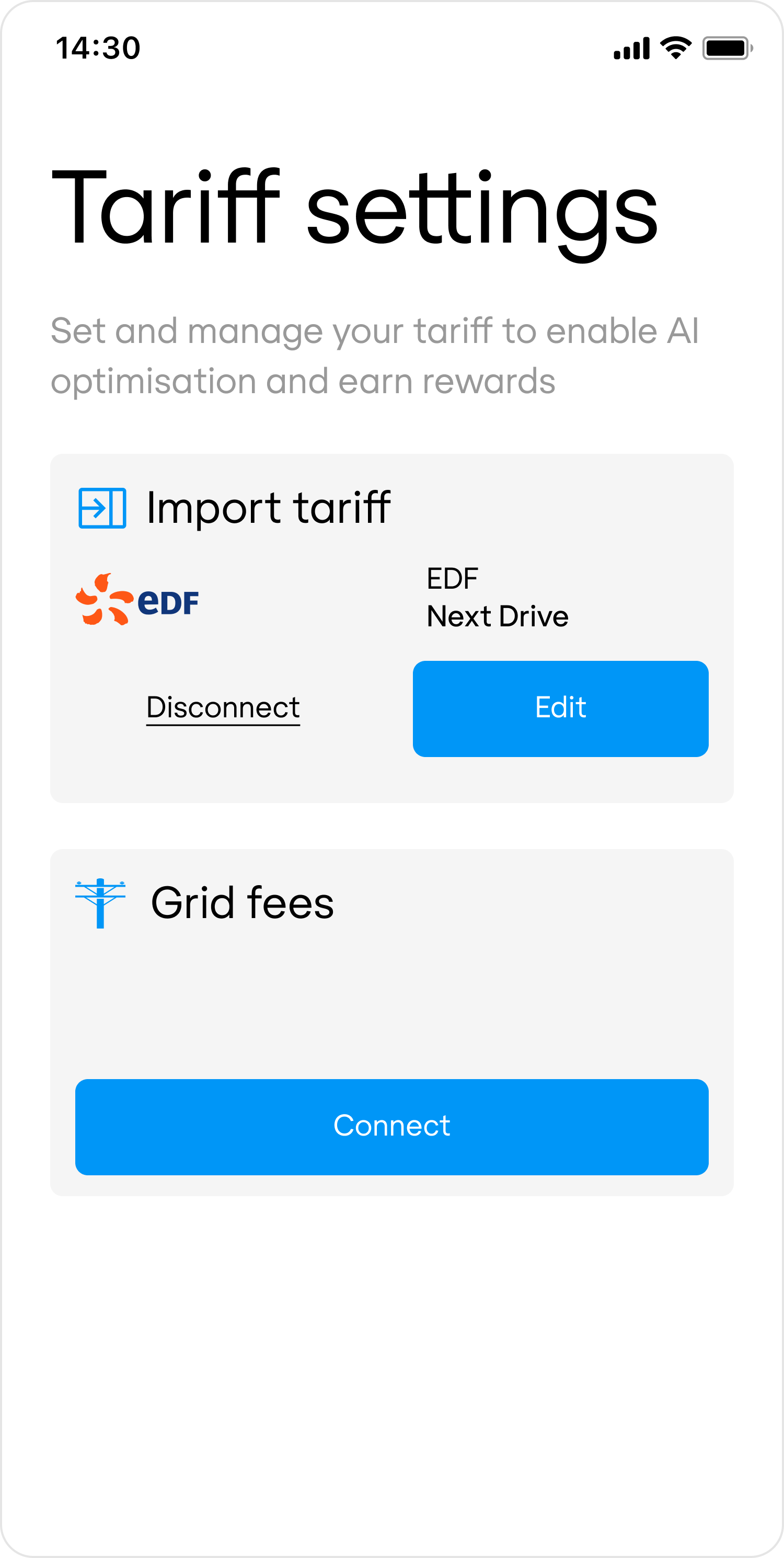
Once a customer connects their `COMMODITY+IMPORT` tariff, Flatpeak automatically determines whether grid fees are included in their import contract. If they are not, Flatpeak checks the customer’s address against its grid fees database.
If a grid fee should be added, the response from the [retrieve-location-status](/api-reference/anode/locations/retrieve-a-location-status) endpoint will include a `non_commodity_import` section.
When this occurs, present the customer with an option to connect **Grid Fees**:
```http Request example theme={"system"}
curl --request GET \
--url https://api.flatpeak.com/locations/loc_641b90b758fb8e6293716e40/status \
--header 'Authorization: Bearer '
```
```json Response example theme={"system"}
{
"id": "loc_641b90b758fb8e6293716e40",
"object": "location_status",
"live_mode": true,
"tariff_status": {
"commodity_import": {
"status": "CONNECTED",
"connection_type": "DIRECT",
"provider": {
"id": "prv_63a6087272921ef075a8fd3e",
"display_name": "EDF",
"logo_url": "https://s.flatpeak.com/83b06a60e38c2.png"
},
"price": {
"id": "trf_66ba584eb6923d7c3b942ef6",
"display_name": "Next Drive"
}
},
"commodity_export": {
"status": "NOT_CONNECTED"
},
"local_import": {
"status": "ERROR",
"connection_type": "DIRECT",
"provider": {
"id": "prv_63a6087272921ef075a8fd3e",
"display_name": "Svea Solar",
"logo_url": "https://s.flatpeak.com/83b06a60e38c2.png"
},
"price": {
"id": "trf_6728b0e6b6e6106dd5a88f8d",
"display_name": "Fixed 2c"
}
}
}
}
```
When a customer wants to edit their tariff connection, call the [create-connect-token](/api-reference/anode/connect/create-a-connect-token) endpoint, specifying the Flatpeak Location ID, tariff type, and direction. Then call the [start-a-connect-session](/api-reference/anode/connect/start-a-connect-session) endpoint.
* If the tariff is already connected, Connect will return the [Tariff Summary](/api-reference/anode/connect/tariff-summary) page.
* If it is not connected, Connect will run the normal flow, prompting the customer to select their provider and complete the setup.
```json Request example {16,17,18} theme={"system"}
curl --request POST \
--url https://api.flatpeak.com/connect/token \
--header 'Authorization: Bearer ' \
--header 'Content-Type: application/json' \
--data '{
"connect_url": "",
"callback_url": "",
"postal_address": {
"address_line1": "1-3",
"address_line2": "Strand",
"city": "London",
"state": "Greater London",
"post_code": "WC2N 5EH",
"country_code": "GB"
},
"location_id": "loc_641b90b758fb8e6293716e40",
"tariff_type": "COMMODITY",
"tariff_direction": "IMPORT"
}'
```
To disconnect a tariff for a specific type and direction, call the [create-connect-token](/api-reference/anode/connect/create-a-connect-token) endpoint, specifying the Location ID, tariff type, and direction, and set `actions.disconnect_tariff = true`.
This will automatically remove the tariff connection — no Connect session is required.
```json Request example {10} theme={"system"}
curl --request POST \
--url https://api.flatpeak.com/connect/token \
--header 'Authorization: Bearer ' \
--header 'Content-Type: application/json' \
--data '{
"location_id": "loc_641b90b758fb8e6293716e40",
"tariff_direction": "IMPORT",
"tariff_type": "COMMODITY",
"actions": {
"disconnect_tariff": true
}
}'
```
```json Response example theme={"system"}
{
"connect_token": "cot_65df3e949a785c52283026ec",
"expires_in": 86400,
"live_mode": true
}
```
This feature is in limited Beta. [Contact support](https://dashboard.flatpeak.com/#support) for early access.
Once a customer connects their `COMMODITY+IMPORT` tariff, Flatpeak automatically determines whether grid fees are included in their import contract. If they are not, Flatpeak checks the customer’s address against its grid fees database.
If a grid fee should be added, the response from the [retrieve-location-status](/api-reference/anode/locations/retrieve-a-location-status) endpoint will include a `non_commodity_import` section.
When this occurs, present the customer with an option to connect **Grid Fees**:
 ```http Request example theme={"system"}
curl --request GET \
--url https://api.flatpeak.com/locations/loc_641b90b758fb8e6293716e40/status \
--header 'Authorization: Bearer '
```
```json Response example {19,20} theme={"system"}
{
"id": "loc_641b90b758fb8e6293716e40",
"object": "location_status",
"live_mode": true,
"tariff_status": {
"commodity_import": {
"status": "CONNECTED",
"connection_type": "MANUAL",
"provider": {
"id": "prv_63a6087272921ef075a8fd3e",
"display_name": "EDF",
"logo_url": "https://s.flatpeak.com/83b06a60e38c2.png"
},
"price": {
"id": "trf_66ba584eb6923d7c3b942ef6",
"display_name": "Next Drive"
}
},
"non_commodity_import": {
"status": "NOT_CONNECTED"
}
}
}
```
### Summary
Depending on your use case, you may choose to implement one or more of the following options:
| | |
| :--------------------- | :-------------------------------------------------------------------------------------- |
| `COMMODITY+IMPORT` | Most common case: price of electricity supplied from the grid into the property. |
| `COMMODITY+EXPORT` | When energy can be sent from the property back to the grid. |
| `LOCAL+IMPORT` | When you need to set a tariff that applies to local energy generation, e.g. PV. |
| `NON_COMMODITY+IMPORT` | When [grid fees](/guides/sources/grid-fees) are billed separately. (Coming in Q1 2026). |
```http Request example theme={"system"}
curl --request GET \
--url https://api.flatpeak.com/locations/loc_641b90b758fb8e6293716e40/status \
--header 'Authorization: Bearer '
```
```json Response example {19,20} theme={"system"}
{
"id": "loc_641b90b758fb8e6293716e40",
"object": "location_status",
"live_mode": true,
"tariff_status": {
"commodity_import": {
"status": "CONNECTED",
"connection_type": "MANUAL",
"provider": {
"id": "prv_63a6087272921ef075a8fd3e",
"display_name": "EDF",
"logo_url": "https://s.flatpeak.com/83b06a60e38c2.png"
},
"price": {
"id": "trf_66ba584eb6923d7c3b942ef6",
"display_name": "Next Drive"
}
},
"non_commodity_import": {
"status": "NOT_CONNECTED"
}
}
}
```
### Summary
Depending on your use case, you may choose to implement one or more of the following options:
| | |
| :--------------------- | :-------------------------------------------------------------------------------------- |
| `COMMODITY+IMPORT` | Most common case: price of electricity supplied from the grid into the property. |
| `COMMODITY+EXPORT` | When energy can be sent from the property back to the grid. |
| `LOCAL+IMPORT` | When you need to set a tariff that applies to local energy generation, e.g. PV. |
| `NON_COMMODITY+IMPORT` | When [grid fees](/guides/sources/grid-fees) are billed separately. (Coming in Q1 2026). |