> ## Documentation Index
> Fetch the complete documentation index at: https://docs.flatpeak.com/llms.txt
> Use this file to discover all available pages before exploring further.
# Quickstart
In this guide, you will connect an energy account using Flatpeak Connect and retrieve the electricity price.
If you have not yet done so, [create a Dashboard account](https://flatpeak.com/signup) and [contact support](https://dashboard.flatpeak.com/#support) to activate your **30-day free trial**.
1. Go to the [Dashboard](https://dashboard.flatpeak.com/) > **API Keys** and retrieve your **Account ID** and **API Key**.
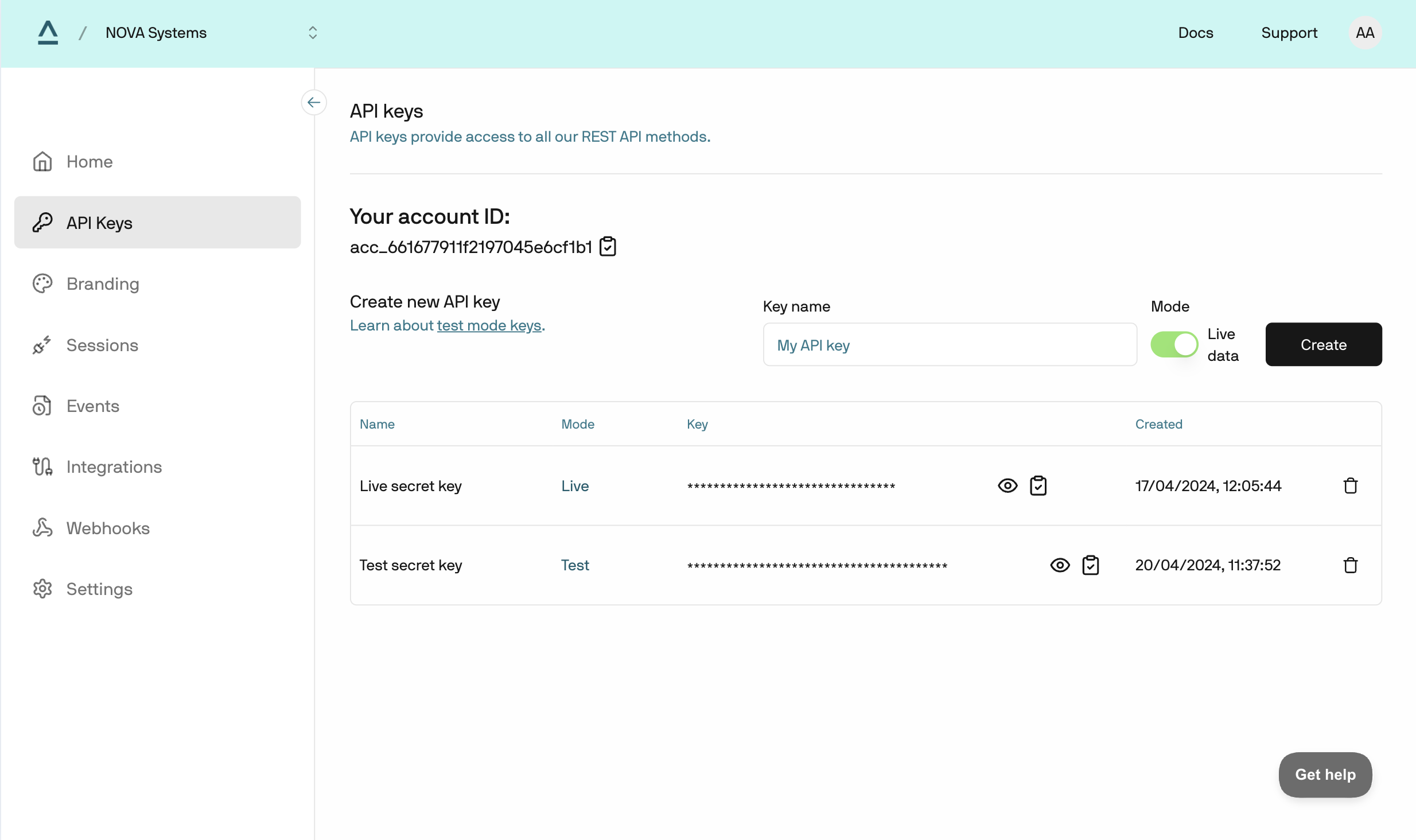 2. Base64 encode `account_id:api_key` and call [authentication](/api-reference/anode/authentication) endpoint.
```bash Request example theme={"system"}
curl --request GET \
--url https://api.flatpeak.com/login \
--header 'Authorization: Basic '
```
```json Response example theme={"system"}
{
"bearer_token": "eyJhbGciOiJIUzI1NiIsInR5cC",
"expires_in": 3600,
"live_mode": true
}
```
Connect tokens are **single-use** session keys that let your app launch Flatpeak Connect securely without exposing API keys.
To create a Connect token, call [create-connect-token](/api-reference/anode/connect/create-a-connect-token) endpoint:
```json Request example theme={"system"}
curl --request POST \
--url https://api.flatpeak.com/connect/token \
--header 'Authorization: Bearer ' \
--header 'Content-Type: application/json' \
--data '{
"connect_url": "https://anode.connect-web.flatpeak.com",
"callback_url": "myapp://nova/flatpeak/complete",
"postal_address": {
"address_line1": "1-3",
"address_line2": "Strand",
"city": "London",
"state": "Greater London",
"post_code": "WC2N 5EH",
"country_code": "GB"
}
}'
```
```json Response example theme={"system"}
{
"connect_token": "cot_6587fa4362341be5b524de3b",
"expires_in": "86400"
}
```
The Flatpeak-hosted demo of the Connect app is available at:
[https://anode.connect-web.flatpeak.com](https://anode.connect-web.flatpeak.com)
Append your `connect_token` to the URL as shown below:
```http theme={"system"}
https://anode.connect-web.flatpeak.com/?fp_cot=cot_6587fa4362341be5b524de3b
```
The Connect app guides you through selecting your energy provider and granting tariff access. It automatically chooses the best connection method based on available integrations, market coverage, and data-sharing rules.
[Learn more about how Flatpeak Connect works](/guides/connect/architecture)
2. Base64 encode `account_id:api_key` and call [authentication](/api-reference/anode/authentication) endpoint.
```bash Request example theme={"system"}
curl --request GET \
--url https://api.flatpeak.com/login \
--header 'Authorization: Basic '
```
```json Response example theme={"system"}
{
"bearer_token": "eyJhbGciOiJIUzI1NiIsInR5cC",
"expires_in": 3600,
"live_mode": true
}
```
Connect tokens are **single-use** session keys that let your app launch Flatpeak Connect securely without exposing API keys.
To create a Connect token, call [create-connect-token](/api-reference/anode/connect/create-a-connect-token) endpoint:
```json Request example theme={"system"}
curl --request POST \
--url https://api.flatpeak.com/connect/token \
--header 'Authorization: Bearer ' \
--header 'Content-Type: application/json' \
--data '{
"connect_url": "https://anode.connect-web.flatpeak.com",
"callback_url": "myapp://nova/flatpeak/complete",
"postal_address": {
"address_line1": "1-3",
"address_line2": "Strand",
"city": "London",
"state": "Greater London",
"post_code": "WC2N 5EH",
"country_code": "GB"
}
}'
```
```json Response example theme={"system"}
{
"connect_token": "cot_6587fa4362341be5b524de3b",
"expires_in": "86400"
}
```
The Flatpeak-hosted demo of the Connect app is available at:
[https://anode.connect-web.flatpeak.com](https://anode.connect-web.flatpeak.com)
Append your `connect_token` to the URL as shown below:
```http theme={"system"}
https://anode.connect-web.flatpeak.com/?fp_cot=cot_6587fa4362341be5b524de3b
```
The Connect app guides you through selecting your energy provider and granting tariff access. It automatically chooses the best connection method based on available integrations, market coverage, and data-sharing rules.
[Learn more about how Flatpeak Connect works](/guides/connect/architecture)
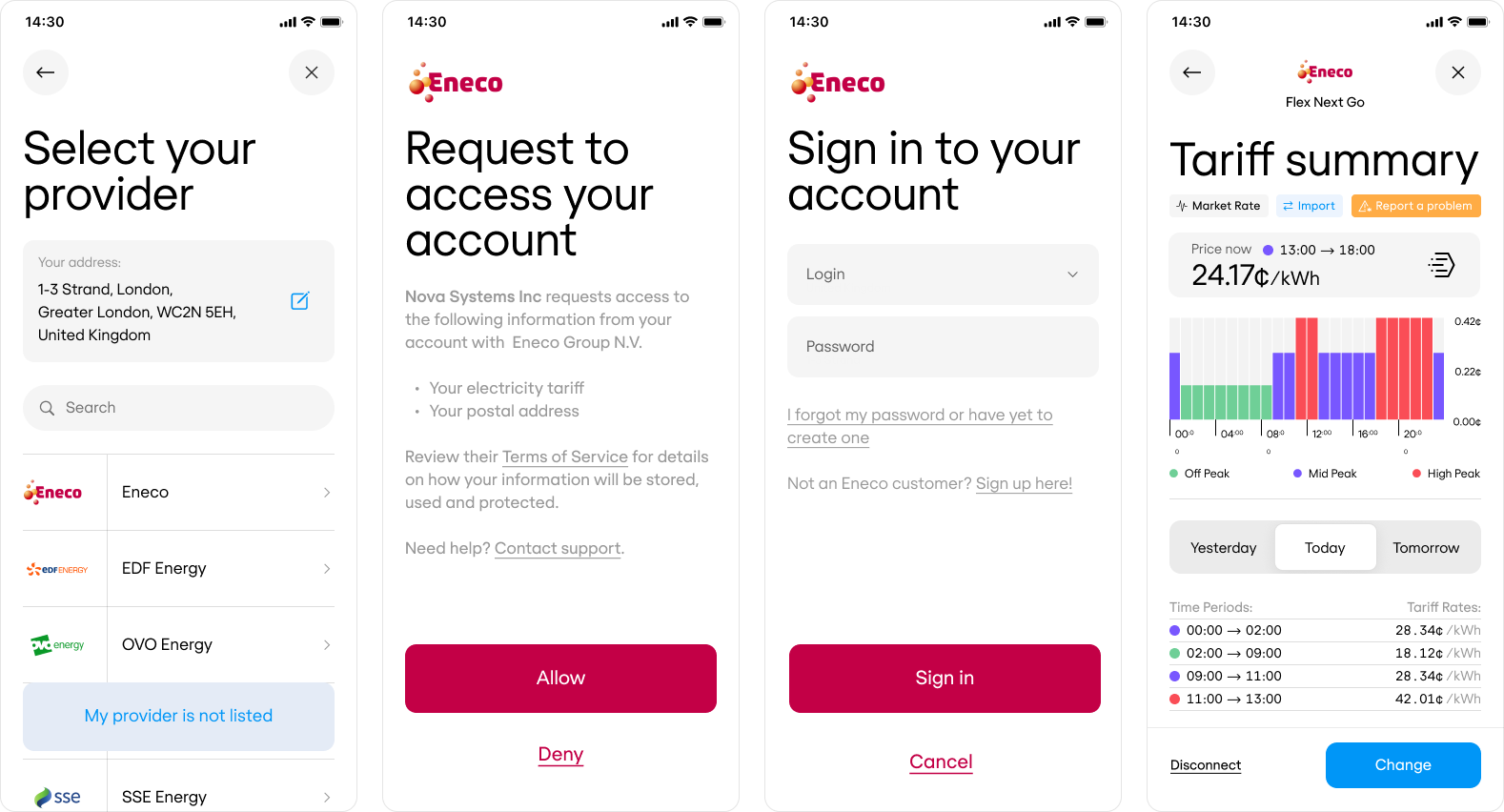 To test Connect quickly, use your own account from any supported energy provider. If you don’t have access to one, contact [support](https://dashboard.flatpeak.com/#support) for a test account.
After completing the Connect flow, call the [retrieve-connect-token](/api-reference/anode/connect/retrieve-a-connect-token) endpoint with your `connect_token` to obtain a Flatpeak **Location ID** — a permanent identifier for the customer’s address.
When you build your full integration, store this ID in your database as the reference to the customer's address. You will use it to retrieve electricity prices and access other API endpoints.
For now, just make a note of it.
```bash Request example theme={"system"}
curl --request GET \
--url 'https://api.flatpeak.com/connect/token?connect_token=cot_6587fa4362341be5b524de3b' \
--header 'Authorization: Bearer '
```
```json Response example theme={"system"}
{
"id": "cot_6587fa4362341be5b524de3b",
"object": "connect_token",
"location_id": "loc_641b90b758fb8e6293716e40"
}
```
Using the Location ID as a reference, call the [retrieve-price](/api-reference/anode/prices/retrieve-a-price) endpoint to retrieve your customer’s electricity price.
```json Request example theme={"system"}
curl --request POST \
--url https://api.flatpeak.com/prices/loc_641b90b758fb8e6293716e40 \
--header 'Authorization: Bearer ' \
--header 'Content-Type: application/json' \
--data '{
"start_time": "2023-06-15T09:00:00Z",
"end_time": "2023-06-15T23:00:00Z",
"tariff_direction": "IMPORT"
}'
```
```json Response example theme={"system"}
{
"object": "price",
"location_id": "loc_641b90b758fb8e6293716e40",
"location_timezone": "Europe/Amsterdam",
"currency_code": "EUR",
"tariff_direction":: "IMPORT",
"data": [
{
"start_time": "2023-06-15T09:00:00Z",
"end_time": "2023-06-15T11:00:00Z",
"price": {
"value": 14.998,
"confidence": 1
}
},
{
"start_time": "2023-06-15T11:00:00Z",
"end_time": "2023-06-15T13:00:00Z",
"price": {
"value": 23.072,
"confidence": 0.8
}
}
]
}
```
You’ve now completed the Quickstart. If you haven’t already, [review integration plan options](/#your-integration-plan).
Before you continue, invite your team members to join your Flatpeak account. Go to [Dashboard](https://dashboard.flatpeak.com/) > **Settings** > **Team**, and add their emails. They’ll receive an automatic invitation.
To test Connect quickly, use your own account from any supported energy provider. If you don’t have access to one, contact [support](https://dashboard.flatpeak.com/#support) for a test account.
After completing the Connect flow, call the [retrieve-connect-token](/api-reference/anode/connect/retrieve-a-connect-token) endpoint with your `connect_token` to obtain a Flatpeak **Location ID** — a permanent identifier for the customer’s address.
When you build your full integration, store this ID in your database as the reference to the customer's address. You will use it to retrieve electricity prices and access other API endpoints.
For now, just make a note of it.
```bash Request example theme={"system"}
curl --request GET \
--url 'https://api.flatpeak.com/connect/token?connect_token=cot_6587fa4362341be5b524de3b' \
--header 'Authorization: Bearer '
```
```json Response example theme={"system"}
{
"id": "cot_6587fa4362341be5b524de3b",
"object": "connect_token",
"location_id": "loc_641b90b758fb8e6293716e40"
}
```
Using the Location ID as a reference, call the [retrieve-price](/api-reference/anode/prices/retrieve-a-price) endpoint to retrieve your customer’s electricity price.
```json Request example theme={"system"}
curl --request POST \
--url https://api.flatpeak.com/prices/loc_641b90b758fb8e6293716e40 \
--header 'Authorization: Bearer ' \
--header 'Content-Type: application/json' \
--data '{
"start_time": "2023-06-15T09:00:00Z",
"end_time": "2023-06-15T23:00:00Z",
"tariff_direction": "IMPORT"
}'
```
```json Response example theme={"system"}
{
"object": "price",
"location_id": "loc_641b90b758fb8e6293716e40",
"location_timezone": "Europe/Amsterdam",
"currency_code": "EUR",
"tariff_direction":: "IMPORT",
"data": [
{
"start_time": "2023-06-15T09:00:00Z",
"end_time": "2023-06-15T11:00:00Z",
"price": {
"value": 14.998,
"confidence": 1
}
},
{
"start_time": "2023-06-15T11:00:00Z",
"end_time": "2023-06-15T13:00:00Z",
"price": {
"value": 23.072,
"confidence": 0.8
}
}
]
}
```
You’ve now completed the Quickstart. If you haven’t already, [review integration plan options](/#your-integration-plan).
Before you continue, invite your team members to join your Flatpeak account. Go to [Dashboard](https://dashboard.flatpeak.com/) > **Settings** > **Team**, and add their emails. They’ll receive an automatic invitation.