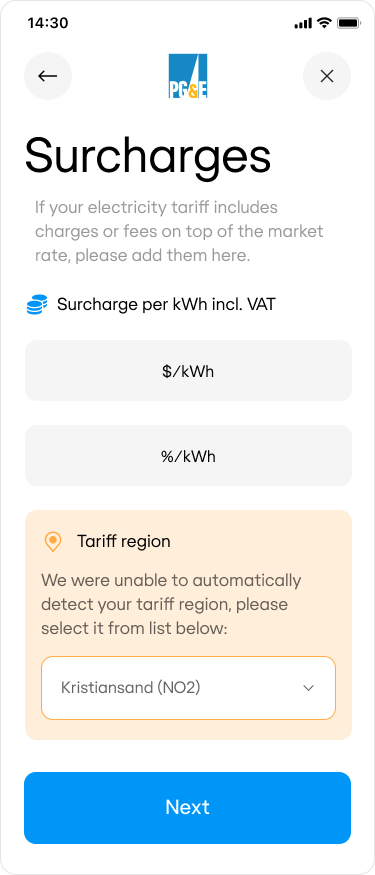
If customers enter their tariff rate manually, depending on their choices, Connect may, depending on your customer’s energy provider, request you to render a page where they can specify tariff rate surcharges. For example, they might be on a MARKET tariff and will be paying additional brokerage fees or taxes on top.
Surcharges are applied by first adding the fixed fee, then applying the percentage to the result.
surcharge.fixed shall be returned in large currency units.
When you POST the response, Connect may return any of these validation errors:
Error Code
Error Description
surcharge_percentage_invalid
Surcharge percentage must be larger than zero.
geo_location_not_found
Unable to find market rates region using geolocation data provided.
market_region_invalid
Specified region is invalid.
data_json_invalid
Data does not conform to the JSON schema.
The Tariff region (region) property is returned only when the customer is on MARKET tariff and Connect service was unable to automatically detect their market region.